2020-10-27 23:23:53 +09:00
Particle Effect For UGUI (UI Particle)
2019-01-17 20:17:53 +09:00
===
2020-02-21 12:09:22 +00:00
This plugin provide a component to render particle effect for uGUI in Unity 2018.2 or later.
2023-08-18 11:32:29 +09:00
The particle rendering is maskable and sortable, without Camera, RenderTexture or Canvas.
2019-01-17 20:17:53 +09:00
2023-08-18 11:32:29 +09:00

2020-02-21 11:42:30 +00:00
[](https://openupm.com/packages/com.coffee.ui-particle/)
2023-08-18 11:32:29 +09:00
[](https://github.com/mob-sakai/ParticleEffectForUGUI/releases)
[)](https://github.com/mob-sakai/ParticleEffectForUGUI/releases)
2020-10-27 23:23:53 +09:00
[](https://github.com/mob-sakai/ParticleEffectForUGUI/releases) [](https://github.com/mob-sakai/ParticleEffectForUGUI/blob/master/LICENSE.txt)
2023-08-18 11:32:29 +09:00
[](http://makeapullrequest.com)
2019-01-17 20:17:53 +09:00
2020-08-31 00:28:38 +00:00
<< [Description ](#Description ) | [Demo ](#demo ) | [Installation ](#installation ) | [Usage ](#usage ) | [Development Note ](#development-note ) | [Change log ](https://github.com/mob-sakai/ParticleEffectForUGUI/blob/upm/CHANGELOG.md ) >>
2019-01-17 20:17:53 +09:00
<br><br><br><br>
2020-08-31 00:28:38 +00:00
2019-01-17 20:17:53 +09:00
## Description

This plugin uses new APIs `MeshBake/MashTrailBake` (added with Unity 2018.2) to render particles by CanvasRenderer.
You can mask and sort particles for uGUI without Camera, RenderTexture, Canvas.
Compares this "Baking mesh" approach with the conventional approach:
2022-06-21 21:09:59 +09:00
[Performance test results ](https://github.com/mob-sakai/ParticleEffectForUGUI/issues/193#issuecomment-1160028374 )
2019-01-17 20:17:53 +09:00
|Approach|Good|Bad|Screenshot|
|-|-|-|-|
2022-06-21 21:09:59 +09:00
|Baking mesh<br>**\(UIParticle\)**|Rendered as is.<br>Maskable.<br>Sortable.<br>Less objects.|[Not support `TEXCOORD*.zw` components for custom vertex stream ](https://github.com/mob-sakai/ParticleEffectForUGUI/issues/191#issuecomment-1043409186 )|<img src="https://user-images.githubusercontent.com/12690315/41765089-0302b9a2-763e-11e8-88b3-b6ffa306bbb0.gif" width="500px">|
2019-01-17 20:17:53 +09:00
|Do nothing|Rendered as is.|**Looks like a glitch.**<br>Not maskable.<br>Not sortable.|<img src="https://user-images.githubusercontent.com/12690315/41765090-0329828a-763e-11e8-8d8a-f1d269ea3bc7.gif" width="500px">|
|Convert particle to UIVertex<br>[\(UIParticleSystem\) ](https://forum.unity.com/threads/free-script-particle-systems-in-ui-screen-space-overlay.406862/ )|Maskable.<br>Sortable.<br>Less objects.|**Adjustment is difficult.**<br>Requires UI shaders.<br>Difficult to adjust scale.<br>Force hierarchy scalling.<br>Simulation results are incorrect.<br>Trail, rotation of transform, time scaling are not supported.<br>Generate heavy GC every frame.|<img src="https://user-images.githubusercontent.com/12690315/41765088-02deb9c6-763e-11e8-98d0-9e0c1766ef39.gif" width="500px">|
|Use Canvas to sort|Rendered as is.<br>Sortable.|**You must to manage sorting orders.**<br>Not maskable.<br>More batches.|<img src="https://user-images.githubusercontent.com/12690315/41765087-02b866ea-763e-11e8-8c33-081c9ad852f8.gif" width="500px">|
|Use RenderTexture|Maskable.<br>Sortable.|**Requires Camera and RenderTexture.**<br>Difficult to adjust position and size.<br>Quality depends on the RenderTexture's setting.|<img src="https://user-images.githubusercontent.com/12690315/41765085-0291b3e2-763e-11e8-827b-72e5ee9bc556.gif" width="500px">|
2022-06-21 21:09:59 +09:00
|Approach|FPS on Editor|FPS on iPhone6|FPS on Xperia XZ|
|--|--|--|--|
|Particle System|43|57|22|
|UIParticleSystem|4|3|0 (unmeasurable)|
|Sorting By Canvas|43|44|18|
|UIParticle|17|12|4|
|UIParticle with MeshSharing|44|45|30|
<br><br>
2019-01-17 20:17:53 +09:00
#### Features
2020-02-21 11:42:30 +00:00
* Easy to use: the package is out-of-the-box
2022-06-21 21:09:59 +09:00
* Sort particle effects and UI by sibling index
2019-01-17 20:17:53 +09:00
* No Camera, RenderTexture or Canvas are required
2022-06-21 21:09:59 +09:00
* Masking by Mask or RectMask2D
2019-01-17 20:17:53 +09:00
* Support Trail module
2022-06-21 21:09:59 +09:00
* Support CanvasGroup alpha
* No allocations
2020-08-31 00:28:38 +00:00
* Support overlay, camera space and world space
2023-08-18 11:32:29 +09:00
* Support Universal Render Pipeline (URP) and High Definition Render Pipeline (HDRP)
* Support disabling `Enter Play Mode Options > Reload Domain`
2020-10-27 23:23:53 +09:00
* Support changing material property with AnimationClip (AnimatableProperty)
2019-02-23 23:39:55 +09:00

2022-06-18 10:19:16 +09:00
* [4.0.0+] Support 8+ materials
* [4.0.0+] Correct world space particle position when changing window size for standalone platforms (Windows, MacOSX and Linux)
* [4.0.0+] Adaptive scaling for UI
* [4.0.0+] Mesh sharing group to improve performance

2022-06-25 13:21:49 +09:00
* [4.0.0+] Particle attractor component
2022-06-18 10:19:16 +09:00

2022-06-25 13:21:49 +09:00
* [4.1.0+] Relative/Absolute particle position mode

2019-01-17 20:17:53 +09:00
2019-01-17 20:48:30 +09:00
2019-01-17 20:17:53 +09:00
<br><br><br><br>
2020-08-31 00:28:38 +00:00
## Demo
2019-01-17 20:17:53 +09:00
2022-06-18 10:19:16 +09:00
* [WebGL Demo ](https://mob-sakai.github.io/demos/UIParticle_Demo/index.html )
> 
2020-08-31 00:28:38 +00:00
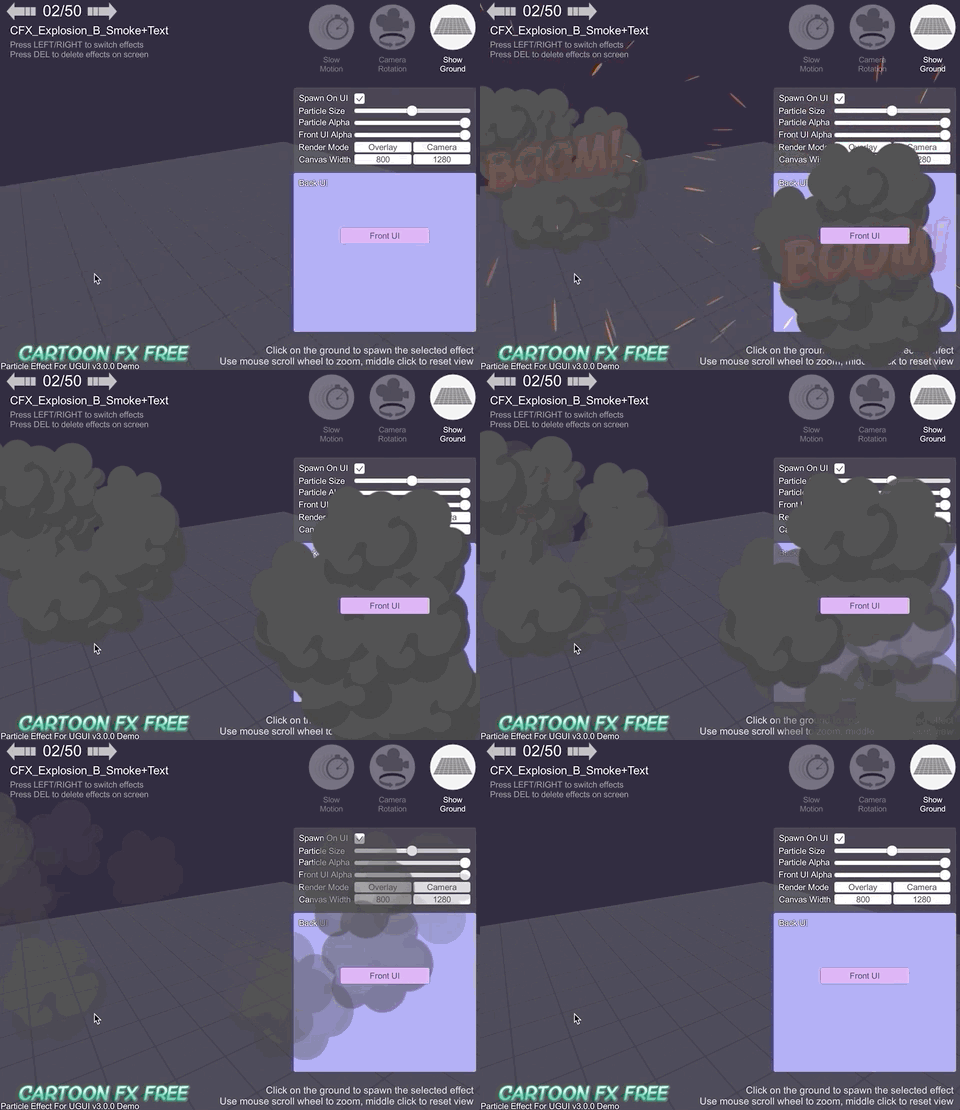
* [WebGL Demo (Cartoon FX & War FX) ](https://mob-sakai.github.io/Demos/ParticleEffectForUGUI_CFX )
* [Cartoon FX Free][CFX] & [War FX][WFX] (by [Jean Moreno (JMO)][JMO]) with UIParticle
2022-06-18 10:19:16 +09:00
> 
2019-01-17 20:17:53 +09:00
2020-08-31 00:28:38 +00:00
[CFX]: https://assetstore.unity.com/packages/vfx/particles/cartoon-fx-free-109565
[WFX]: https://assetstore.unity.com/packages/vfx/particles/war-fx-5669
[JMO]: https://assetstore.unity.com/publishers/1669
2019-01-17 20:17:53 +09:00
2020-02-21 11:42:30 +00:00
<br><br><br><br>
2020-08-31 00:28:38 +00:00
2020-02-21 11:42:30 +00:00
## Installation
2020-08-31 00:28:38 +00:00
### Requirement
2023-08-18 11:32:29 +09:00
Unity 2018.2 or later
2020-08-31 00:28:38 +00:00
2023-08-18 11:32:29 +09:00
### Install via OpenUPM
2020-02-21 11:42:30 +00:00
2023-08-18 11:32:29 +09:00
This package is available on [OpenUPM ](https://openupm.com ).
It's recommended to install it via [openupm-cli ](https://github.com/openupm/openupm-cli ).
2020-02-21 11:42:30 +00:00
```
openupm add com.coffee.ui-particle
```
2023-08-18 11:32:29 +09:00
### Install via Package Manager Window (using Git URL)
2019-01-17 20:48:30 +09:00
2023-08-18 11:32:29 +09:00
1. Select `Window/Package Manager` menu to open `Package Manager` window.
2. Click `+` and `Install package from git URL...`

3. Input `https://github.com/mob-sakai/ParticleEffectForUGUI.git` and click `Install`

2020-10-27 23:23:53 +09:00
2020-02-18 02:11:03 +00:00
Or, use [UpmGitExtension ](https://github.com/mob-sakai/UpmGitExtension ) to install and update the package.
2023-08-18 11:32:29 +09:00
### Install via manifest.json (using Git URL)
2020-02-21 11:42:30 +00:00
2023-08-18 11:32:29 +09:00
1. Open `Packages/manifest.json` in your project.
2. Add this line below `"dependencies": {`
* `"com.coffee.ui-particle": "https://github.com/mob-sakai/ParticleEffectForUGUI.git",`

3. To update the package, change suffix `#{version}` .
* `"com.coffee.ui-particle": "https://github.com/mob-sakai/ParticleEffectForUGUI.git#4.2.0",`
2020-02-18 02:11:03 +00:00
2023-08-18 11:32:29 +09:00
### Install as an embed package
2019-01-17 20:48:30 +09:00
2023-08-18 11:32:29 +09:00
1. Download a source code zip file from [Releases ](https://github.com/mob-sakai/ParticleEffectForUGUI/releases ) page
2. Extract it and place it under `Packages` directory in your project.

2019-01-17 20:48:30 +09:00
<br><br><br><br>
2020-08-31 00:28:38 +00:00
2019-01-17 20:48:30 +09:00
## How to play demo
2020-08-31 00:28:38 +00:00
### For Unity 2019.1 or later
2020-02-21 11:42:30 +00:00
1. Open `Package Manager` window
2. Select `UI Particle` package in package list
2020-10-04 14:26:53 +00:00
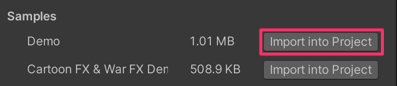
3. Click `Import Sample` button
2020-02-21 11:42:30 +00:00
4. The demo project is imported into `Assets/Samples/UI Particle/{version}/Demo`
5. Open `UIParticle_Demo` scene and play it
2020-08-31 00:28:38 +00:00
### For Unity 2018.4 or earlier
2020-02-21 11:42:30 +00:00
1. Select `Assets/Samples/UI Particle Demo` from menu
2. The demo project is imported into `Assets/Samples/UI Particle/{version}/Demo`
3. Open `UIParticle_Demo` scene and play it
2019-01-17 20:48:30 +09:00
2020-10-27 23:23:53 +09:00
### About `Cartoon FX & War Fx Demo`
* It requires free assets ([Cartoon FX Free][CFX] & [War FX][WFX])
* by [Jean Moreno (JMO)][JMO]
2019-01-17 20:48:30 +09:00
2019-01-17 20:17:53 +09:00
<br><br><br><br>
2020-08-31 00:28:38 +00:00
2019-01-17 20:17:53 +09:00
## Usage
2020-10-04 14:26:53 +00:00
### UIParticle component
`UIParticle` controls the ParticleSystems that is attached to its own game objects and child game objects.
2023-08-18 11:32:29 +09:00

2020-10-04 14:26:53 +00:00
2020-11-20 14:46:11 +09:00
| Properties | Description |
| -- | -- |
| Maskable | Does this graphic allow masking. |
| Scale | Scale the rendering.<br>When the `3D` toggle is enabled, 3D scale (x,y,z) is supported. |
| Animatable Properties | If you want update material properties (e.g. `_MainTex_ST` , `_Color` ) in AnimationClip, use this to mark the changes. |
2022-06-18 10:19:16 +09:00
| Mesh Sharing | Particle simulation results are shared within the same group.<br>A large number of the same effects can be displayed with a small load.<br>When the `Random` toggle is enabled, it will be grouped randomaly. |
2023-08-18 11:32:29 +09:00
| Position Mode | **Absolute: ** Emit from the world position of the `ParticleSystem` .<br>**Relative:** Emit from the scaled position of the `ParticleSystem` . |
| Auto Scaling | Transform.lossyScale (=world scale) will be set to `(1, 1, 1)` on update.<br>It prevents the root-Canvas scale from affecting the hierarchy-scaled `ParticleSystem` . |
| Rendering Order | The ParticleSystem list to be rendered.<br>You can change the order and the materials. |
2020-10-04 14:26:53 +00:00
NOTE: Press `Refresh` button to reconstruct rendering order based on children ParticleSystem's sorting order and z position.
<br><br>
2020-08-31 00:28:38 +00:00
### Basically usage
2020-10-04 14:26:53 +00:00
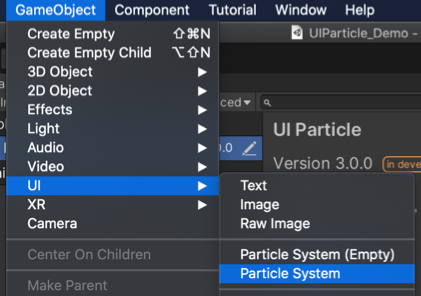
1. Select `Game Object/UI/ParticleSystem` to create UIParticle with a ParticleSystem.
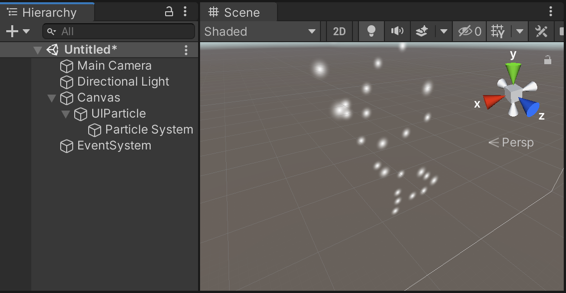
2. Adjust the ParticleSystem as you like.
<br><br>
2022-06-18 10:19:16 +09:00
### With your existing ParticleSystem prefab
2020-08-31 00:28:38 +00:00
2020-10-04 14:26:53 +00:00
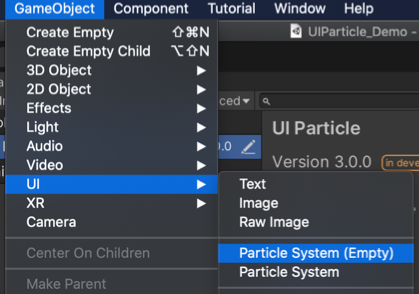
1. Select `Game Object/UI/ParticleSystem (Empty)` to create UIParticle.
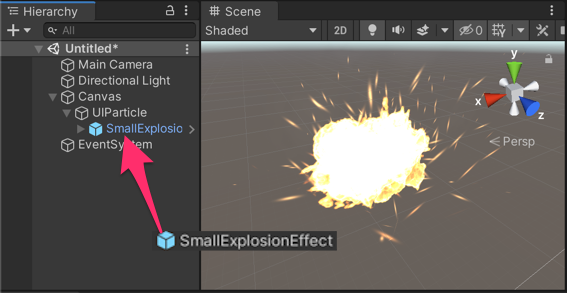
2. Drag & drop your ParticleSystem prefab on UIParticle.
2020-08-31 00:28:38 +00:00
2020-10-04 14:26:53 +00:00
<br><br>
2019-01-17 20:17:53 +09:00
2022-08-30 09:40:59 +09:00
### With `Mask` or `RectMask2D` component
2019-01-17 20:17:53 +09:00
2020-10-04 14:26:53 +00:00
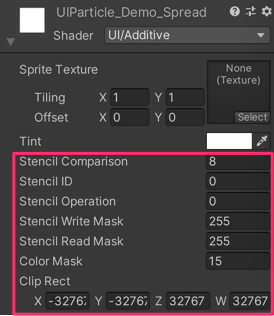
If you want to mask particles, set a stencil supported shader (such as `UI/UIAdditive` ) to material for ParticleSystem.
2022-08-30 09:40:59 +09:00
If you use some custom shaders, see [How to make a custom shader to support Mask/RectMask2D component ](#how-to-make-a-custom-shader-to-support-maskrectmask2d-component ) section.
2020-10-04 14:26:53 +00:00
<br><br>
### Script usage
```cs
// Instant ParticleSystem prefab with UIParticle on runtime.
var go = GameObject.Instantiate(prefab);
var uiParticle = go.AddComponent<UIParticle>();
2022-06-18 10:19:16 +09:00
// Control by ParticleSystem.
particleSystem.Play();
particleSystem.Emit(10);
// Control by UIParticle.
2020-10-04 14:26:53 +00:00
uiParticle.Play();
uiParticle.Stop();
```
2019-01-17 20:17:53 +09:00
2022-06-18 10:19:16 +09:00
<br><br>
### UIParticleAttractor component
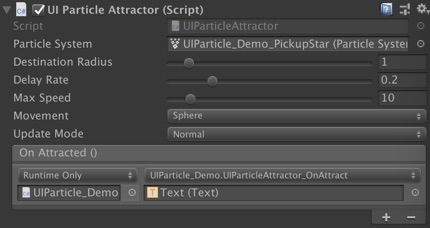
`UIParticleAttractor` attracts particles generated by the specified ParticleSystem.
2023-08-18 11:32:29 +09:00
2022-06-18 10:19:16 +09:00

| Properties | Description |
| -- | -- |
| Particle System | Attracts particles generated by the specified particle system. |
| Distination Radius | Once the particle is within the radius, the particle lifetime will become 0 and `OnAttracted` will be called. |
| Delay Rate | Delay to start attracting.<br>It is a percentage of the particle's start lifetime. |
| Max Speed | Maximum speed of attracting.<br> If this value is too small, attracting may not be completed by the end of the lifetime and `OnAttracted` may not be called. |
| Movement | Attracting movement type. (Linear, Smooth, Sphere) |
2023-08-18 11:32:29 +09:00
| Update Mode | **Normal: ** Update with scaled delta time.<br>**Unscaled Time:** Update with unscaled delta time. |
2022-06-18 10:19:16 +09:00
| OnAttracted | An event called when attracting is complete (per particle). |
2019-01-17 20:17:53 +09:00
<br><br><br><br>
2020-08-31 00:28:38 +00:00
2019-01-17 20:17:53 +09:00
## Development Note
2023-08-18 17:17:30 +09:00
### FAQ: Why are my particle effects not displayed correctly?
If `ParticleSystem` alone displays particles correctly but `UIParticle` does not, please check the following points:
* [Shader Limitation ](https://github.com/mob-sakai/ParticleEffectForUGUI#shader-limitation )
* Most cases can be solved by using `UI/Additive` or `UI/Default` .
* Particles are masked
* `UIParticle` is maskable.
* Set `Mask` or `RectMask2D` component properly.
* Particles are too small
* If particles are small enough, they will not appear on the screen.
* Increase the `Scale` value.
* If you don't want to change the apparent size depending on the resolution, try `Auto Scaling` option.
* Particles are too many
* No more than 65535 vertices can be displayed (for mesh combination limitations).
* Please set `Emission` module and `Max Particles` of ParticleSystem properly.
* Particles are emitted off-screen.
* When `Position Mode = Relative` , particles are emitted from scaled position of the ParticleSystem, not from the screen point of the ParticleSystem.
* Place the ParticleSystem in the proper position or try `Position Mode = Absolute` .
* Attaching `UIParticle` to the same object as `ParticleSystem`
* `Transform.localScale` will be overridden by `Auto Scaling` option.
* It is recommended to place `ParticleSystem` under `UIParticle` .
<br>
2022-06-18 10:19:16 +09:00
### Shader Limitation
2019-02-23 23:39:55 +09:00
2023-08-18 11:32:29 +09:00
The use of UI shaders is recommended.
- If you need a simple Additive shader, use the `UI/Additive` shader instead.
- If you need a simple alpha-blend shader, use the `UI/Default` shader instead.
- If your custom shader does not work properly with UIParticle, consider creating a custom UI shader.
#### Built-in shaders are not supported
UIParticle does not support all built-in shaders except for `UI/Default` .
If their use is detected, an error is displayed in the inspector.
Use UI shaders instead.
#### UV.zw components will be discarded
UIParticleRenderer renders the particles based on UIVertex.
Therefore, only xy components is available for each UV in the shader. (zw components will be discarded).
2022-06-18 10:19:16 +09:00
So unfortunately UIParticles will not work well with some shaders.
2023-08-18 11:32:29 +09:00
#### Custom vertex streams
2022-06-18 10:19:16 +09:00
When using custom vertex streams, you can fill zw components with "unnecessary" data.
https://github.com/mob-sakai/ParticleEffectForUGUI/issues/191
2019-02-23 23:39:55 +09:00
2023-08-18 11:32:29 +09:00
<br>
2019-02-23 23:39:55 +09:00
2022-06-18 10:19:16 +09:00
### Overheads
2019-02-23 23:39:55 +09:00
2022-06-18 10:19:16 +09:00
UIParticle has some overheads and the batching depends on uGUI.
When improving performance, keep the following in mind:
- If you are displaying a large number of the same effect, consider `Mesh Sharing` feature in [UIParticle Component ](#uiparticle-component ).
- If you don't like the uniform output, consider `Random Group` feature.

- If you are using multiple materials, you will have more draw calls.
- Consider single material, atlasing the sprites, and using `Sprite` mode in the `Texture Sheet Animation` module in ParticleSystem.
2019-01-17 20:17:53 +09:00
2022-08-30 09:40:59 +09:00
### How to make a custom shader to support Mask/RectMask2D component
<details>
<summary>Shader tips</summary>
```ShaderLab
Shader "Your/Custom/Shader"
{
Properties
{
// ...
// #### required for Mask ####
_StencilComp ("Stencil Comparison", Float) = 8
_Stencil ("Stencil ID", Float) = 0
_StencilOp ("Stencil Operation", Float) = 0
_StencilWriteMask ("Stencil Write Mask", Float) = 255
_StencilReadMask ("Stencil Read Mask", Float) = 255
_ColorMask ("Color Mask", Float) = 15
[Toggle(UNITY_UI_ALPHACLIP)] _UseUIAlphaClip ("Use Alpha Clip", Float) = 0
}
SubShader
{
Tags
{
// ...
}
// #### required for Mask ####
Stencil
{
Ref [_Stencil]
Comp [_StencilComp]
Pass [_StencilOp]
ReadMask [_StencilReadMask]
WriteMask [_StencilWriteMask]
}
ColorMask [_ColorMask]
// ...
Pass
{
// ...
// #### required for RectMask2D ####
#include "UnityUI.cginc"
#pragma multi_compile _ _ UNITY_UI_CLIP_RECT
float4 _ClipRect;
// #### required for Mask ####
#pragma multi_compile _ _ UNITY_UI_ALPHACLIP
struct appdata_t
{
// ...
};
struct v2f
{
// ...
// #### required for RectMask2D ####
float4 worldPosition : TEXCOORD1;
};
v2f vert(appdata_t v)
{
v2f OUT;
// ...
// #### required for RectMask2D ####
OUT.worldPosition = v.vertex;
return OUT;
}
fixed4 frag(v2f IN) : SV_Target
{
// ...
// #### required for RectMask2D ####
#ifdef UNITY_UI_CLIP_RECT
color.a *= UnityGet2DClipping(IN.worldPosition.xy, _ClipRect);
#endif
// #### required for Mask ####
#ifdef UNITY_UI_ALPHACLIP
clip (color.a - 0.001);
#endif
return color;
}
ENDCG
}
}
}
```
</details>
2019-01-17 20:17:53 +09:00
<br><br><br><br>
2020-08-31 00:28:38 +00:00
## Contributing
### Issues
Issues are very valuable to this project.
- Ideas are a valuable source of contributions others can make
- Problems show where this project is lacking
- With a question you show where contributors can improve the user experience
### Pull Requests
Pull requests are, a great way to get your ideas into this repository.
See [CONTRIBUTING.md ](/../../blob/develop/CONTRIBUTING.md ).
### Support
This is an open source project that I am developing in my spare time.
If you like it, please support me.
With your support, I can spend more time on development. :)
[](https://www.patreon.com/join/mob_sakai?)
[](https://github.com/users/mob-sakai/sponsorship)
2019-01-17 20:17:53 +09:00
2020-02-21 11:42:30 +00:00
<br><br><br><br>
2020-08-31 00:28:38 +00:00
## License
* MIT
2020-02-21 11:42:30 +00:00
2019-01-17 20:17:53 +09:00
## Author
2020-10-27 23:23:53 +09:00
*  [mob-sakai ](https://github.com/mob-sakai ) [](https://twitter.com/intent/follow?screen_name=mob_sakai) 
2019-01-17 20:17:53 +09:00
## See Also
* GitHub page : https://github.com/mob-sakai/ParticleEffectForUGUI
* Releases : https://github.com/mob-sakai/ParticleEffectForUGUI/releases
* Issue tracker : https://github.com/mob-sakai/ParticleEffectForUGUI/issues
2019-01-17 21:42:14 +09:00
* Change log : https://github.com/mob-sakai/ParticleEffectForUGUI/blob/upm/CHANGELOG.md


